All-in-One Free Minecraft Tools
All-in-One Minecraft Tools to help you with generating banners, grabbing skins, creating custom MOTDs, designing shields, titles, enchantments, and fireworks.
Tools Collection
Frequently Asked Questions
Open crafting, place 6 planks (wood) around the top-left to bottom-right edges and 1 iron ingot in the top-center. Use our Shield page to preview and apply banner patterns to shields.
Use the Banner Maker to add layers (base color + patterns like stripes, borders, gradients, and icons). Then export the loom steps or copy the command for Java.
Yes. Enter a username or URL in Skin Stealer to preview and download the skin (PNG). Upload it to your profile launcher or Bedrock as supported.
The Enchantment Calculator shows compatible enchants, max levels, conflicts, and the XP/books you'll need so you can plan before using the anvil or table.
Use the Firework Generator. Pick paper + gunpowder, then add a firework star (dyes, trail, twinkle, shapes). It returns recipes, commands, and flight duration.
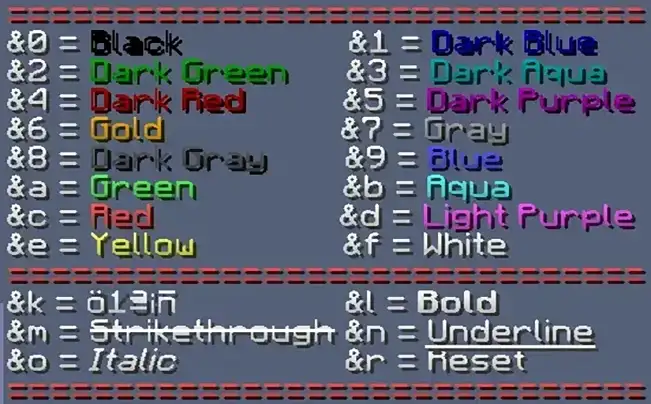
See Color Codes for the full list of colors and formats (bold, italic, underline, obfuscated). Copy codes for signs, books, and server MOTDs where supported.
Try the Text Generator for chat styling and the Title Generator for /title command syntax with instant previews.
Use the Tellraw Generator to build components with colors, hover and click events, then copy the valid command directly.
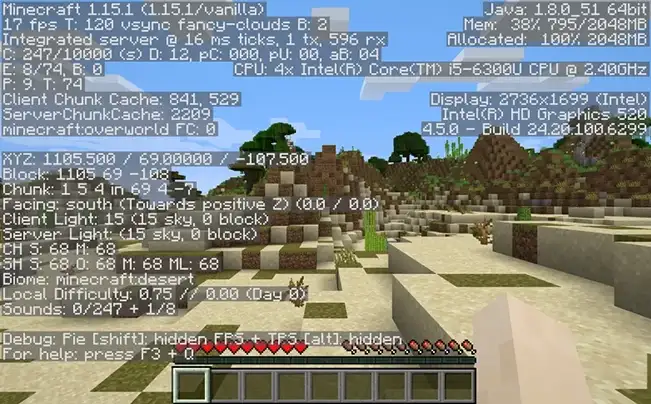
Use the Coordinates / Chunk Border Calculator. Enter your XYZ to see chunk location, region info, and distances for farms and portals.
Yes. The Potion Maker lists ingredients, durations, and amplifier levels (Awkward to Splash or Lingering) and outputs the exact brewing steps.
Most tools work for both editions. When behavior differs, we clearly label Java vs Bedrock and provide the correct output.
Yes. All tools are completely free to use and will always remain free.